01
Support repeats the same answers
Prepare answers from FAQs and guides. Complex questions still go to your team.
FOR OPERATIONS & CUSTOMER SUPPORT TEAMS
A quick reply means little if nobody records the next step. We scope chatbots and workflows that connect questions, records, and human review.
Start with one process. Test before expanding.
How can I change my order?
Order guide · FAQs · Policies
An answer based on available information.
Missing context? Hand over to the team.
Business data as context
Purposeful integrations
Your team stays in control
START WITH A REAL PROBLEM
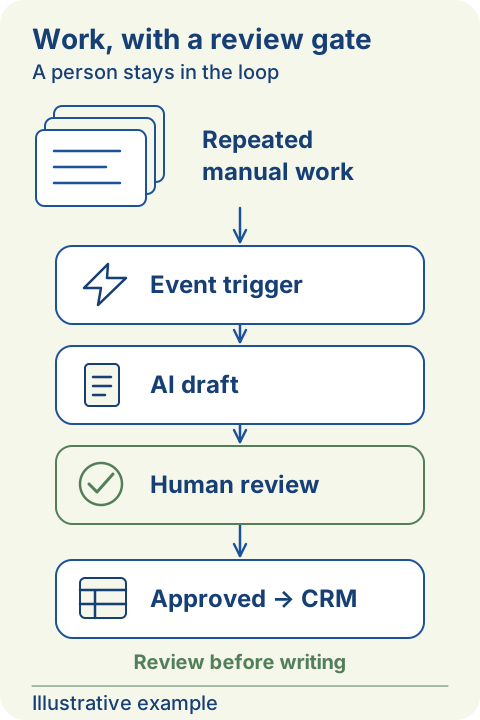
Copying details between chat, spreadsheets, and CRM can hide missed handoffs. Start with one repeatable task and a named owner.
Prepare answers from FAQs and guides. Complex questions still go to your team.
Build an internal knowledge assistant so your team can find the context they need.
Connect forms, lead records, notifications, and work systems through an agreed workflow.
Adjust a few inputs. Use the result to start a scope discussion.
A time scenario, not measured savings. No money or payback estimate.
Manual hours = tasks × minutes × days ÷ 60. Scenario potential = manual hours × automatable share × (1 − review share). Review applies to the automatable portion. Remaining = manual − potential. Setup, exceptions, accuracy and real workload need validation; no AI runs here.
Your answers stay in this page. Nothing is sent or saved.
WHAT WE CAN BUILD
Use n8n workflows for repeatable rules; add AI where a task needs language or business context.
Assistants grounded in your business sources, with clear answer boundaries and escalation paths.
Connect inputs, validation, records, and notifications across apps through APIs or webhooks.
Test one use case with sample data and evaluation criteria before a wider implementation.
HOW WE WORK
Review tasks, data sources, access, and human decision points.
Test the flow with sample data and the integrations it needs.
Review answer quality, failure cases, usage costs, and human review needs.
The agreed scope includes usage guidance and issue handling documentation.
BUILT WITH CLEAR BOUNDARIES
Your team approves important actions. We define sources, permissions, and escalation before implementation.
BEFORE WE BEGIN
Start with what you have. We review quality, access permissions, and gaps before deciding what can be tested.
It depends on risk and data quality. Unclear questions and important actions can be routed to human review.
Development scope is discussed separately from third-party fees. Model usage, hosting, and integrations are reviewed for your use case.
Costs, technical choices and readiness—start with your needs.
Topic: AI automation feasibility and custom project cost
Bring one manual process, sample inputs, the applications involved, and decisions requiring team approval. Kavushion reviews data sources, access, integrations, and evaluation criteria to define a testable scope. Development is priced against that scope; model usage, hosting, and third-party services are discussed separately rather than presented as a fixed AI rate.
Explore the related topicTopic: AI automation time savings scenario versus financial ROI
No; the simulator creates a time scenario from your task volume, duration, working days, and automation and review assumptions. It does not establish technical feasibility, measured savings, or financial ROI. Use it to frame a discussion, then compare actual pilot effort with implementation, usage, and exception-handling costs before making a financial assessment.
Explore the related topicTopic: human review approval gates for AI automation
Identify approval points for important actions, answers with missing context, and cases that could affect customers or business records. Separate drafting from sending or changing records, and assign an owner and escalation path. Test the review queue and rejection cases in the prototype before allowing a wider set of automatic actions.
Explore the related topicTopic: RAG knowledge assistant versus chatbot for business documents
A chatbot is a conversational interface, while RAG adds source retrieval to help construct answers; the two can work together. A limited set of stable FAQs may only need a rules-based flow. For questions spanning business documents, scope source retrieval, answer references, access permissions, and missing-information behavior in a proof of concept.
Explore the related topicTopic: AI email classification and team routing workflow
Collect labeled email examples and assign an owner to each request type. Use rules for clear signals, then test AI on messages that require language interpretation. Route uncertain categories to review, record the routing rationale, and require approval before the flow sends replies or creates consequential follow-up actions.
Explore the related topicTopic: CRM lead deduplication automation from forms
Agree matching keys such as a customer ID or normalized email, then map form fields to CRM fields. Use rules for exact matches and send ambiguous candidates to review instead of automatically merging them. Test repeat submissions, missing data, and conflicting values so updates and exceptions follow explicit handling rules.
Explore the related topicTopic: AI invoice information extraction with verification
Limit the prototype to extracting fields such as invoice number, supplier, date, and amount from permitted document samples. Check results against the source document and validation rules, routing unclear fields to a reviewer. Keep extraction separate from payment approval; this workflow does not determine tax treatment or provide legal advice.
Explore the related topicTopic: internal document search assistant with source permissions
Inventory approved sources and map document permissions to user identities before prototyping. Discuss restrictions at source retrieval rather than merely hiding answers in the interface. Test cross-department questions, permission changes, and document references so both retrieved content and citations are checked against what the requesting user may access.
Explore the related topicTopic: AI workflow monitoring failure alerts and fallback
Define step status, notification ownership, and a manual continuation path when a service is unavailable. Log enough failure context while considering data sensitivity, and agree retry limits and duplicate-action handling. Include timeouts, empty responses, and failed record writes in evaluation rather than checking only the successful path.
Explore the related topicTopic: AI integration services for business APIs and webhooks
Prepare an application list, sample data transfers, API or webhook documentation, and the people who can approve access. Map data direction, validation, and permitted actions for each connection. Kavushion can discuss a prototype around available access; connection capabilities and final scope must be confirmed rather than assumed for every application.
Explore the related topicTopic: AI workflow staff handover and operations guidance
Assign responsibility for monitoring queues, approving actions, and handling issues before implementation. Within the handover scope, discuss usage instructions, answer boundaries, troubleshooting, and how to stop the flow and return to manual work. Have staff walk through a failure example so the guidance becomes an actionable operating procedure, not just a technical description.
Explore the related topicTopic: business data readiness for an AI proof of concept
Start with available sources, but choose permitted samples with a named content owner. Review completeness, readability, conflicting versions, and questions the material cannot answer. Limit the proof of concept to information that can be checked, and document the data improvements needed before relying on its outputs in everyday operations.
Explore the related topicTopic: AI project privacy and data usage agreement checklist
Agree permitted data, processing purposes, recipients, storage, retention, and deletion procedures within the project agreement. Clarify data usage by the selected services before uploading sensitive information; do not assume every provider has the same terms. Discussing scope and controls is not a compliance guarantee or permission to use data without authorization.
Explore the related topicTopic: recurring API model and hosting costs for AI automation
Discuss model or API usage, hosting, storage, integration services, and maintenance separately from development scope. Costs can vary with task volume, document size, call counts, and retries. Use observed prototype usage to establish budgeting assumptions and usage limits; the site's time scenario does not calculate these service costs.
Explore the related topicTopic: rules based workflow versus AI for low volume tasks
Check whether inputs are structured and decisions can be written as clear rules before adding an AI model. For low-volume work, consider setup effort, exceptions, usage costs, and human review as well. Compare manual handling, a rules-based workflow, and an AI prototype on the same examples, then choose the simplest adequate approach.
Explore the related topicTopic: AI automation proof of concept acceptance criteria
Agree the task, representative inputs, expected outputs, and mandatory human handoffs before building the prototype. Include ambiguous inputs, missing sources, and integration failures in acceptance criteria. Review quality, review workload, and service usage with the business owner; a convincing demonstration alone does not establish readiness for a wider implementation.
Explore the related topicTopic: measure business AI assistant answer accuracy
Create questions with reference answers reviewed by business-source owners, including questions that cannot legitimately be answered. Score factual correctness, source support, completeness, and appropriate escalation separately. Record error patterns and changes after adjustments, then recheck on examples not used to tune the prototype before drawing conclusions about quality.
Explore the related topicTopic: prompt injection precautions for business document assistants
Treat email and document content as untrusted data, not authorization to change rules or execute actions. Discuss source restrictions, tool access, output validation, and human approval for consequential operations in prototype design. Test instructions attempting to disclose data or redirect the task; these precautions do not guarantee protection against every attack.
Explore the related topicTopic: least privilege action access for AI integrations
Separate reading, drafting, record updates, and notifications for each application connection. Grant only access needed for the agreed task, with approval for important changes. Discuss credential ownership, access revocation, and action records, and test out-of-scope requests so connection permissions are not treated as unlimited authority.
Explore the related topicTopic: staged AI workflow rollout after prototype evaluation
Begin with one agreed process and user group, checking outputs before consequential actions. Define expansion criteria using observed quality, failure cases, review workload, and service usage. Keep a manual path and a way to stop the flow, then reevaluate each new source or integration before increasing the scope.
Explore the related topicTopic: AI assistant upkeep when documents and APIs change
Assign owners for knowledge sources, permissions, and application connections during scoping. When documents, fields, or APIs change, check data mappings and rerun the relevant evaluation examples. Separate maintenance needs from initial development costs, and agree who reviews failures and when the flow should be paused for correction.
Explore the related topicTopic: choose the first business workflow for AI automation
Choose a repeatable task with collectable inputs, checkable outputs, and a clear process owner. Weigh its need for language or business context against error risk, data availability, and integration access. Bring one complete example from input to follow-up so discovery focuses on a prototype scope rather than a broad AI feature list.
Explore the related topicTopic: evaluate AI assistant queries in Indonesian English and Japanese
Prepare equivalent questions in each language, including internal terminology, mixed-language inputs, and ambiguous intent. Decide whether answers should follow the user's language and how product names and references are preserved. Have reviewers who understand each language check meaning and source support; success in one language does not establish equal quality in the others.
Explore the related topicTopic: FAQ chatbot answer boundaries and support escalation
List approved FAQs and guides, then identify questions requiring customer-specific context or a team decision. Test whether the prototype recognizes insufficient sources and prepares a handover summary rather than inventing an unsupported answer. The flow on Kavushion's page is illustrative, not an active chatbot reading business data or performing customer actions.
Explore the related topicTopic: AI automation versus a web system for business records
Map whether the problem is recordkeeping, task ownership, or interpreting free-form messages. Forms, work statuses, and rules-based workflows may suit structured records; consider AI where inputs need language or business context. Compare service scopes before choosing, and distinguish the core system from an assistant or integration prototype that supports only one step.
Explore the related topicSTART WITH ONE TASK
Bring one manual task, the tools involved, and a sample input. We will check what is worth testing.